Ask about HHKB in any keyboard community and the thread will be about Topre — whether it counts as
mechanical, whether it is worth the money, what it feels like.
That is not the decision you are about to get wrong. The switch is excellent and
almost everyone likes it. What sends HHKBs back to the seller is the layout: no dedicated
arrow keys, Control where your Caps Lock used to be, and three regional variants where only one of
them behaves the way you expect.
This guide settles the Topre question properly, then spends its time on the part that actually
determines whether you keep the keyboard: which layout to order, and what living without
arrow keys is really like.
Quick Reference: HHKB vs Realforce
| HHKB | Realforce | |
|---|---|---|
| Size | 60% — 60 keys | Full size or tenkeyless |
| Arrow keys | None on US layout. Fn + right hand | Yes, dedicated |
| Control key | Where Caps Lock normally is | Standard position |
| Availability abroad | US official site, Amazon, 2-year warranty | Amazon and specialists. Thinner selection |
| Buy it if | You live in a terminal or a text editor | You want Topre without relearning anything |
| Both use Topre electrostatic capacitive switches. The typing feel is not what separates them. The layout is. | ||
Why Japanese Keyboards — and Is Topre Mechanical?
Both keyboards in this guide use switches from Topre Corporation, a Japanese
manufacturer whose main business is not keyboards at all. The switch has been in production for
decades with very little change, which tells you most of what you need to know about it.
And it settles the argument the English-speaking keyboard world has been having for years.
The honest answer: no, and it does not matter
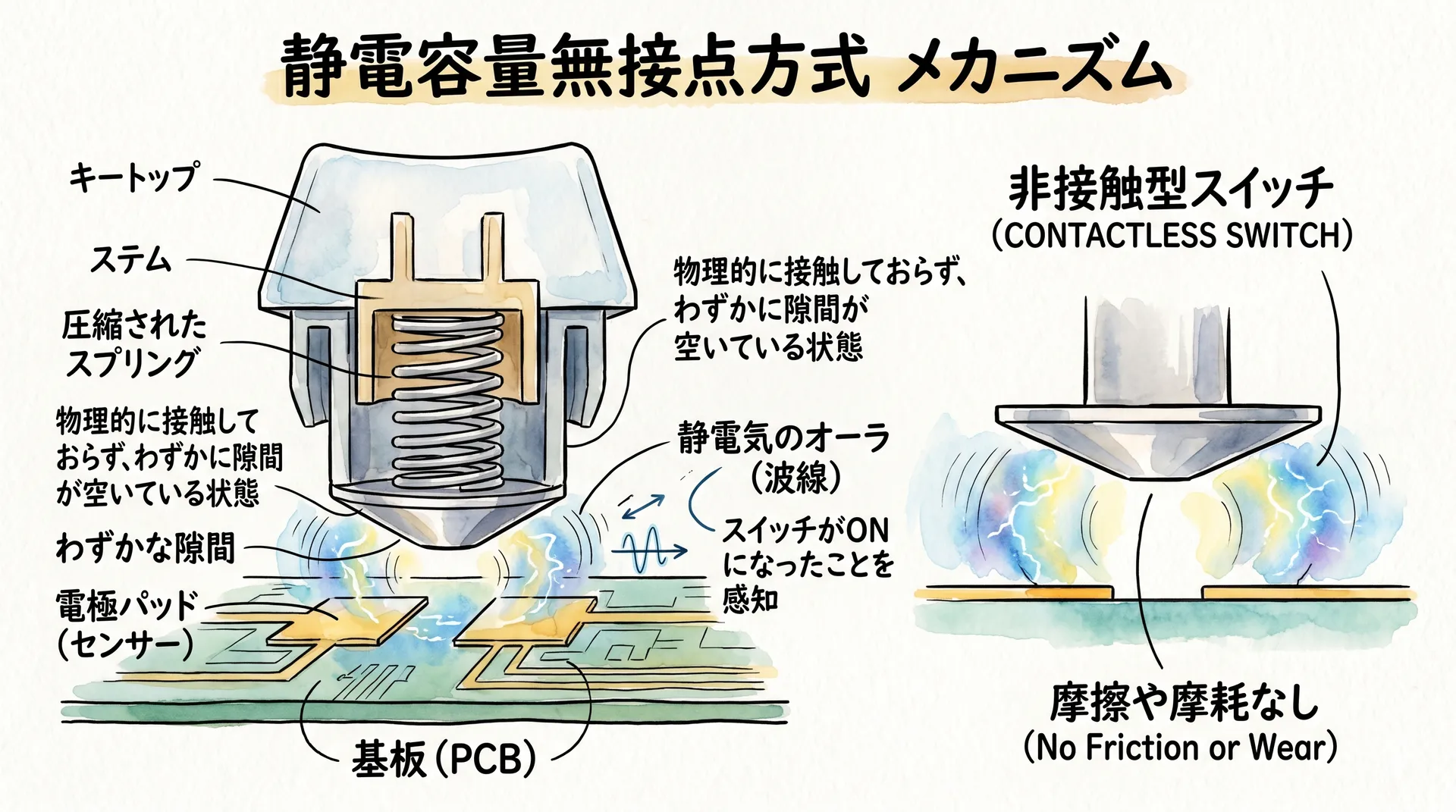
A Topre switch works like this:
- A rubber dome provides the return force and the tactile bump you feel.
- A conical metal coil spring sits underneath and compresses as you press.
- A trace on the PCB senses the change in capacitance that the spring's movement causes, and registers the keystroke.
There is no metal crosspoint contact — no leaf touching another leaf — and that contact is the defining feature of a Cherry MX-style mechanical switch. So on a strict definition, Topre is not mechanical. It is electrostatic capacitive.
People who then dismiss it as "an expensive rubber dome" have got the wrong end of it. A membrane keyboard uses a rubber dome to make an electrical contact, which is why it feels mushy at the bottom. Topre uses the dome only for feel and never for switching — the registration is done capacitively, before the key bottoms out. That is a different machine that happens to share one component.
Why anyone cares about a switch with no contacts
- Nothing wears out by rubbing. No contact means no contact degradation, which is why decade-old units still work.
- It is quiet without feeling dead. The dome absorbs the impact that makes mechanical switches loud.
- The force curve is smooth rather than clicky — a gradual build to a soft tactile point.
- No debounce delay from bouncing contacts, because there are none to bounce.
Order the Right Layout, or Send It Back
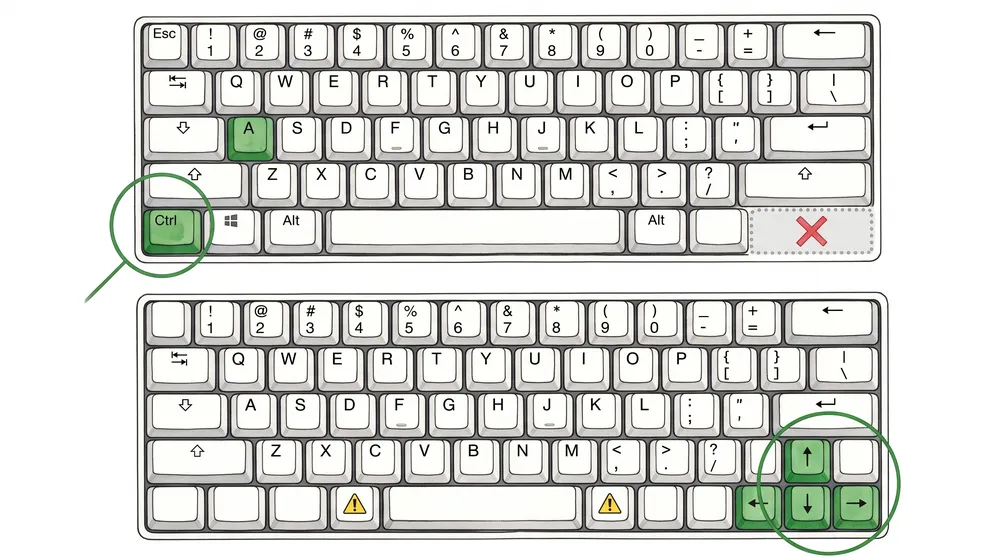
This is the section that saves you a return. HHKB sells in three regional layouts and they are not cosmetic variations.
| Layout | Arrow keys | Order this if |
|---|---|---|
| US (ANSI) | None. Fn + ; ' [ / | You type in English and want the classic 60% experience |
| UK | None | You need the UK symbol positions and £ |
| JP (JIS) | Yes — dedicated arrow keys return | You want arrows, or you type Japanese |
The trap
The JP layout is the only HHKB with real arrow keys — but it also moves the
symbols, adds Japanese input keys, and puts a shorter spacebar on the board. If you type English
on a JIS layout without changing your OS keyboard setting, the symbols you get will not
match the ones printed on the keys.
Choosing JP for the arrows means accepting the whole JIS layout with it. Decide which annoyance
you would rather have.
Blank or printed keycaps
HHKB famously sells blank keycaps, and they are not a gimmick — the keyboard is aimed at people who do not look down. Buy printed unless you already touch-type confidently. The romance of blank keys wears off faster than the habit of glancing at a keyboard does, and printed caps cost the same.
Where Control lives
On HHKB, Control sits where Caps Lock is on a normal keyboard. If you use a terminal, Emacs, or vim, this is the single best thing about the board and you will resent every other keyboard afterwards. If you do not, it is a two-week adjustment for no gain.
Which One to Buy
HHKB has a US site run by PFU America and full Amazon distribution with a two-year advance exchange warranty, which is unusually good support for a Japanese niche product. Realforce is available but through fewer channels.
HHKB Professional Hybrid Type-S — the one to get
The full-fat model: Bluetooth and USB, and the Type-S silencing that removes most of the noise without deadening the feel. If you are spending this much on a keyboard, the Type-S damping is the upgrade actually worth paying for — it is the difference between a keyboard you can use on a call and one you cannot.
- Switch
- Topre electrostatic capacitive, 45g
- Connection
- Bluetooth (4 devices) + USB-C
- Type-S
- Silenced. Noticeably quieter
- Arrow keys
- None on US layout — Fn + right hand
- Warranty
- 2-year advance exchange in the US
- Price range
- $320–$400
Perfect for: Developers and writers who switch between a laptop and a desktop, and anyone in a shared room.
HHKB Professional Classic — wired, cheaper, same switch
USB-C only, no Bluetooth, no Type-S damping. The switch and the layout are identical, so this is the honest way to find out whether the HHKB layout suits you before committing to the Hybrid. Louder than the Type-S, which some people prefer anyway.
- Switch
- Topre, 45g
- Connection
- USB-C, wired only
- Sound
- Not silenced. A distinct thock
- Price range
- $230–$280
Perfect for: A desktop that never moves, and anyone testing the waters on the 60% layout.
REALFORCE — Topre without relearning anything
Same switch family, conventional layout. Dedicated arrow keys, Control in the
normal place, function row present, available as full-size or tenkeyless. If what attracted
you to HHKB was the typing feel rather than the minimalism, this is the keyboard you
actually wanted.
Distribution outside Japan is real but thinner than HHKB's — Amazon and keyboard specialists
rather than an official regional storefront.
- Switch
- Topre, 30g / 45g / 55g, or variable weighting
- Layout
- Conventional. Arrow keys included
- Sizes
- Full size and tenkeyless
- Price range
- $220–$350
Perfect for: Almost everyone who is not specifically after the HHKB layout. This is the safe answer.
HHKB Studio — the odd one out
Worth knowing about: the Studio keeps the HHKB layout but swaps Topre for mechanical switches and adds a pointing stick and gesture pads. It is a different product wearing the same name. If you came here for the Topre feel, the Studio is not it — check the switch type before ordering, because the model names are close enough to confuse.
Key Weight: 30g, 45g, 55g and Variable
Topre boards come in different actuation weights, and this is a genuine preference rather than a tier — heavier is not better.
- 45g — what HHKB ships and what most people should buy. Light enough for long sessions, heavy enough to avoid accidental presses.
- 55g — noticeably firmer. Suits heavy typists and anyone who finds themselves triggering keys by resting their fingers.
- 30g — very light. Excellent for people with hand pain or RSI, and unforgiving if you rest your hands on the keys.
- Variable weighting — a Realforce speciality. Weaker fingers get lighter keys: the little finger columns are lightened, the index and middle columns left heavier. It sounds like a gimmick and it is the most convincing argument for buying a Realforce.
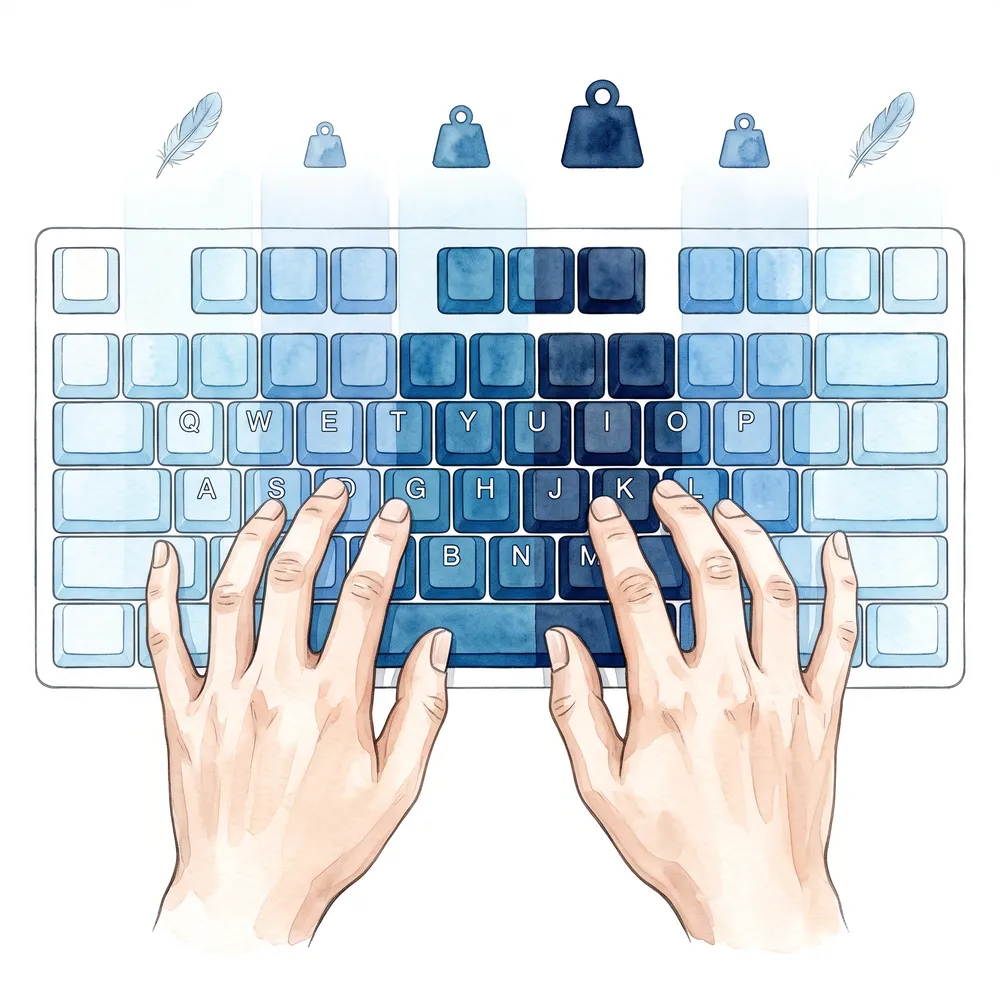
Why variable weighting is the real argument for Realforce
Your little finger is not as strong as your index finger, but on a normal keyboard every key
takes the same force. Variable weighting lightens the columns your weakest fingers
reach for and leaves the strong ones firm.
It reads like a marketing line and it is the thing people notice within an hour — the little
finger stops being the part of your hand that gets tired first.
If you cannot try one, buy 45g. It is the default for a reason, and the weight is not something you can change afterwards without replacing domes.
Living Without Arrow Keys
The honest account, because this is what decides whether the keyboard stays on your desk.
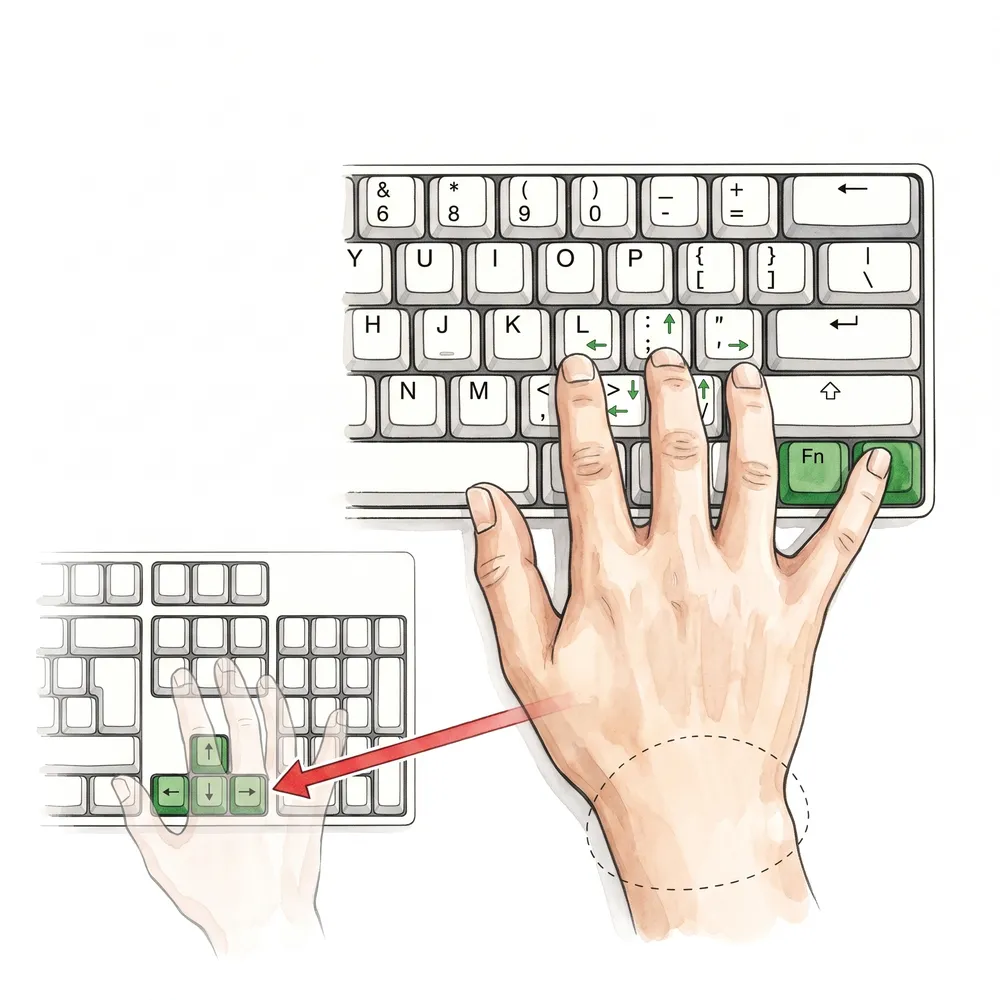
On the US layout, arrows are Fn held with the right little finger, then the right index
and middle fingers on the ; ' [ /
cluster.
Your hand does not leave the home row, which is the entire design argument. On
a full-size board, reaching the arrow cluster means moving your whole hand off the keys and
then finding your way back.
Who adapts within a week
- People who already navigate text with keyboard shortcuts rather than arrows.
- vim and Emacs users, for whom this layout is close to purpose-built.
- Anyone whose work is mostly typing prose or code in one window.
Who does not
- Spreadsheet users. Arrow keys are the primary interface to a spreadsheet and Fn-chording them is genuinely worse.
- Gamers. Not the arrows so much as the missing function row and the modifier positions.
- People who move between this and a normal keyboard all day. The context switching never quite stops costing you.
If you are in the second group, buy a Realforce. You get the same switch and none of the argument. There is no prize for persisting with a layout that fights your work.
Frequently Asked Questions
Is Topre a mechanical switch?
Strictly, no — it is electrostatic capacitive. A rubber dome provides the feel
and return, a conical spring changes the capacitance, and a PCB trace senses it. There is no
metal contact, which is what defines a Cherry MX-style mechanical switch.
It is also not a membrane keyboard: a membrane uses the dome to make the
electrical contact, and Topre never does. Different machine, one shared part.
Which layout should I order?
US if you type English and want the classic HHKB experience. The JP layout is the
only one with dedicated arrow keys, but it brings the whole JIS layout with it — different symbol
positions, extra input keys, shorter spacebar.
Do not order JP just for the arrows unless you have thought about the rest.
HHKB or Realforce?
Realforce, unless you specifically want the 60% layout. Same switch family,
conventional layout, arrow keys, function row, and a variable-weighting option HHKB does not
offer.
Choose HHKB if you live in a terminal and want Control under your little finger — that is the
case where the layout is a feature rather than a tax.
Blank keycaps — worth it?
Only if you already touch-type without glancing down. Printed caps cost the same and remove a daily irritation. The blank version looks wonderful in photographs and is a genuine obstacle if you ever need an unfamiliar symbol.
Is Type-S worth the extra money?
If you share a room or take calls, yes. Type-S adds silencing rings that cut the
bottom-out noise substantially while keeping the switch feel.
If you work alone and like the sound, the Classic is louder in a way many people actively enjoy —
and saves you around a hundred dollars.
Can I buy these outside Japan with a warranty?
HHKB, yes and easily. There is a US site run by PFU America, full Amazon
distribution, and a two-year advance exchange warranty on the main models.
Realforce is available through Amazon and keyboard specialists, but with fewer models and
less consistent regional support — check what you are covered for before buying grey
market.
Final Thoughts: Buy the Layout, Not the Switch
Everyone likes Topre. That is why the switch is the wrong thing to agonise over — it is not where these keyboards differ, and it is not why people give up on them.
Ask instead what your hands do all day. Terminal, editor, prose: HHKB, US layout, printed caps, 45g, Type-S if anyone else can hear you. Spreadsheets, games, or a second keyboard you also use: Realforce, and never think about it again.
Get that right and you have bought a keyboard with no electrical contacts to wear out — which is a decent claim on the word "lifetime".
Japanese Headphones: From the E3000 to Flagships
Japanese Mechanical Pencils: Precision You Can Hold